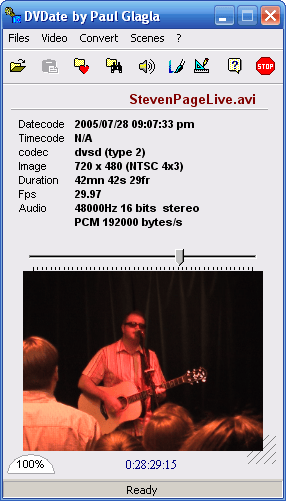
One of the potential hassles of digital video is figuring out exactly when something was recorded and at what point on your tape it was recorded. Digital video cameras add a date stamp dduring the recording process. Very few consumer video editing applications expose this data in a way that makes it usable. Timecode seems to get lost in transfer from tape to computer with consumer applications, including Adobe Premiere Elements.
Assuming your video import process didn’t purge this useful data, DVdate reveals it, providing some valuable metadata about your video. You can use the provided data to re-import only a specific section of footage from a tape. DVdate also makes it possible to maintain a video journal with date stamps for documention purposes.
DVdate exposes the header information in DV-AVI files, converts DivX and MJPEG AVI files to DV-AVI and can overlay datecode info on the screen if you want to see datecode displayed during playback. One killer feature of DVdate is the ability to repair sync issues by fixing frame rate problems introduced during capture. It also flips video between DV-AVI type 1 and type 2, which is necessary for interoperability, especially if you originally imported video using Windows Movie Maker and want to use your footage in any other app. Overall, DVdate is one of many video apps that no digital video editor should be without.
DVdate is compatible with versions of windows From XP through Windows 11.