One of the best ways you can speed up Windows Vista is with ReadyBoost. This is basically a fast USB thumb drive Vista uses as some extra RAM for operating system functions. You need a minimum of a 2GB stick in order to notice any kind of speed bump, but if you use a 4GB USB drive you’ll get even better performance.
An option to configure your USB drive for ReadyBoost is typically available as soon as you stick the drive in a USB slot.
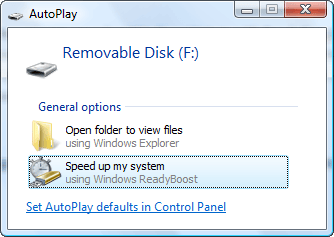
If you don’t see the AutoPlay menu pop up, you can access the setup by right-clicking the drive in Windows Explorer, choosing Properties, and clicking on the ReadyBoost tab.
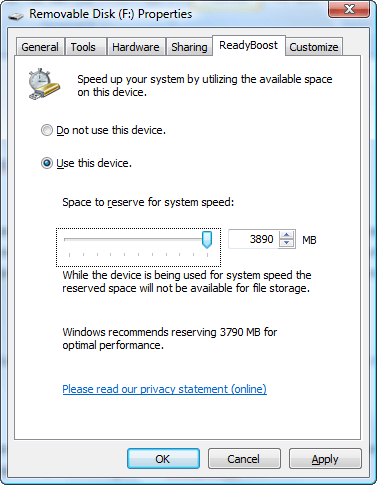
Set the option to Use this device and either accept the Windows recommended default or use the entire thumb drive. You won’t be able to use this drive for storing anything, but the speed boost is well worth using the drive for ReadyBoost. If you need a thumb drive for storage, go buy a second drive.
A few things to keep in mind – you need a USB 2.0 thumb drive for ReadyBoost to work and you also need a thumb drive rated for ReadyBoost. The easiest way to verify this second criteria is to buy a ReadyBoost certified thumb drive from SanDisk or one of the other thumb drive manufacturers. You’re not limited to using thumb drives – a Compact Flash, SD, or other removable memory device will also work.
Discover more from Jake Ludington
Subscribe to get the latest posts sent to your email.